Roku Tv Remote Control
- 3.8
- Rating
- 1.00M
- Installs
- Free
- Price
 Analysis by App-foxy
I have always thought a phone-based television remote should solve one very specific problem: getting control back quickly when the physical remote is missing, out of reach, or simply refuses to cooperate. Roku Tv Remote Control takes that focused approach. It is a free tools app from Attractive Apps Valley designed to connect an Android phone with a Roku TV, and its appeal is easy to understand. Instead of searching between sofa cushions, I can turn to the device already in my hand.
My overall view is positive but practical. This is most useful as a convenient backup and a simple everyday controller, not as a complete replacement for every Roku remote in every home. The app has attracted more than a million installs, which suggests that the problem it addresses is common. At the same time, its average rating of 3.8 from roughly two thousand ratings tells me to keep expectations sensible: connection and day-to-day reliability matter more here than a long list of extra features.
What using the remote feels like in everyday life
The first thing I noticed is how naturally this kind of app fits into a normal evening. Imagine sitting down to watch something and realizing the physical remote is in another room. With the phone nearby, a dedicated Roku TV remote can be quicker than interrupting the routine. It is also handy when several people share a room and the original controller has disappeared into the household shuffle.
You May Also Like

 Blood Strike: 2.5 Anniversary
Blood Strike’s Loadouts Turn Every Drop Into a Tactical Gamble
A close look at Blood Strike’s custom loadouts: how fast access to signature weapons reshapes its battle royale rhythm, rewards preparation, and narrows the gap between fights.

 Pandora - Music & Podcasts
Pandora’s Music Is Easy to Start, but Harder to Recover
Pandora’s strength is its low-effort path from a seed to a station. Its weak spot is how much confidence it asks you to place in connection, setup, and quiet recovery.

 8 Ball Pool
 Is Built on Rivalries, Rematches, and Routine
A close look at the rivalries, rematches, shared routines, and unanswered safety questions that turn a quick pool match into a persistent mobile community.

 Samsung Music
’s Quiet Strength Is Playing What You Already Own
Its reach comes less from spectacle than from dependable access to a personal library. That simplicity is both the app’s strongest retention engine and its ceiling.

 AccuWeather: Weather Radar
AccuWeather Review: A Quick, Clear Forecast for Everyday Decisions
For everyday plans, the best forecast is the one you can understand quickly. AccuWeather makes rain timing, radar, and local conditions easy to act on, with a few trade-offs.

 Hill Climb Racing
Why Hill Climb Racing Still Turns Crashes Into One More Run
A tiny car, a bumpy hill and one more upgrade: Hill Climb Racing keeps resurfacing because its simple chaos makes every near-miss feel personal.
More From Our News Desk



The store summary emphasizes connection in seconds, and that is the right standard for this type of tool. A remote app is valuable only when the initial setup is straightforward and the controls respond without making me think about the technology behind them. I would approach the first connection calmly: keep the phone and television on the same home network, open the app, and look for the Roku device it can control. If the television does not appear immediately, checking the network before repeatedly tapping buttons is the more useful troubleshooting step.
That same-network requirement is an important practical detail for anyone deciding whether this is suitable. A phone using mobile data while the television is connected to home Wi-Fi is not the same situation as both devices sharing the local network. Guests, mesh systems, separate guest networks, and recently changed router settings can also make a simple remote feel unreliable. In my experience, understanding that distinction prevents users from blaming the app for a network arrangement that keeps the devices apart.
Once connected, the appeal is less about novelty and more about replacing a small piece of household friction. A phone is easy to locate, and it is less likely to be permanently lost than a lightweight television remote. I can also keep it beside me while watching, which makes occasional volume or navigation changes convenient. That does not make the app essential, but it makes it useful in the exact moments when a physical controller is inconvenient.
Where it earns its place
The strongest case for this app is as a backup that I can rely on when the original remote is unavailable. That includes moving into a new home, waiting for a replacement controller, managing a television in a guest room, or helping a family member who has difficulty finding the physical remote. The app is also a sensible option for people who already carry their phone everywhere and do not want another object on the coffee table.
There is a subtle advantage to a phone remote that is easy to overlook: it can be easier to find in a dark room. A physical remote may blend into blankets or furniture, while a phone can be located by its screen. That convenience is not a special technical feature, but it changes how useful the app feels in real life. The trade-off is that using the phone introduces a second device that must remain charged, unlocked or accessible, and connected to the same network.
I would also consider it for a shared television where the original remote is frequently moved between rooms. Rather than treating the app as the only controller, I would install it on the phone of the person most likely to need a backup. That approach keeps expectations realistic and avoids turning a convenient tool into a point of argument when someone else is watching and needs the physical remote.
Another practical workflow is to test the connection before the original remote goes missing. Setting up a remote app during a calm moment is much easier than trying to solve a connection problem when the television is already on the wrong input or a child is waiting to watch something. I recommend checking that the television appears, trying the main navigation controls, and then leaving the app ready for occasional use. This small preparation makes the difference between a useful fallback and an app that is installed but forgotten.
What separates convenience from frustration
The main weakness is not the idea itself; it is the dependence on the local connection. A physical Roku remote usually communicates directly with the television or its accompanying hardware, while a phone app depends on the home network and the phone’s own state. If the router is offline, the phone has switched networks, or the television is not reachable, the app cannot magically restore control. That makes it less dependable during network trouble than the original controller.
I would not recommend relying on this as the only way to operate a television in a home where Wi-Fi regularly drops. It is also a poor emergency solution if the television has never been paired and the user is trying to configure everything without another working remote. In that situation, a genuine replacement remote is usually the safer purchase because it does not depend on the same setup path.
There is also a human-factor limitation. A phone is designed for many tasks, so switching into a remote app can be less immediate than picking up a dedicated controller. Notifications, incoming calls, low battery, and accidental touches can interrupt the experience. The phone may be more convenient to locate, but it is not as single-purpose as the usual alternative. For long viewing sessions, some users will still prefer the familiar shape and tactile buttons of the Roku remote that came with the television.
The app is free to install, which lowers the barrier to trying it. However, it includes in-app purchases ranging from around nine dollars to around forty dollars per item. That is worth considering before treating it as a no-cost permanent replacement. I would first decide whether the basic experience solves the actual problem, then examine any purchase screen carefully rather than assuming every useful part is included without charge.
Because the application is rated for Everyone, it is approachable for a broad household audience. That does not remove the need for sensible device habits, though. A child using a phone as a remote can change channels, adjust volume, or interrupt viewing just as easily as with a physical controller. For families, the best setup is to use it as a supervised convenience rather than handing over the main phone without any thought about what else that device can access.
How I would compare it with the usual alternatives
The obvious alternative is the original Roku remote. That controller wins for immediate access, physical buttons, and independence from the phone’s battery. If it is available and working, I would normally choose it for regular viewing. Roku Tv Remote Control becomes more attractive when the original is lost, damaged, misplaced, or shared between rooms.
A replacement physical remote is the better option for someone who wants a permanent, dedicated controller and dislikes depending on Wi-Fi. It is also preferable for a television used by older relatives who may find a phone interface less familiar than large tactile buttons. The app is the better first experiment for someone who already owns a compatible Roku television, has a stable home network, and wants to avoid buying another accessory immediately.
Universal remotes occupy a middle ground. They can operate several types of home entertainment equipment and may be valuable in a setup with multiple brands. This app is narrower and therefore easier to understand: its purpose is controlling a Roku TV from a phone. If the main need is one Roku television, that focus is an advantage. If the household includes several devices from different manufacturers, a universal controller may offer better overall coverage.
There is also the television maker’s own remote solution to consider. A first-party option may feel more reassuring to users who want the closest possible match to the platform, while this app’s appeal is its accessibility and straightforward purpose. I would choose based on the problem at hand: quick backup control favors trying this app, while long-term dependence and broad equipment support favor a dedicated or official alternative.
Small habits that make the experience better
First, I would keep the phone on the regular home network rather than a guest network. This is the most important practical check because the app needs the phone to reach the television. If the device list is empty, I would verify network names and temporarily disable any setup that isolates connected devices before assuming the television is unsupported.
Second, I would avoid testing it for the first time during a rushed viewing moment. Open it when the television is already available, confirm the connection, and try navigation before relying on it. This catches the most common source of disappointment: an app that has been installed but never properly connected.
Third, I would treat the phone as a backup rather than leaving it permanently assigned to television duty. Keeping the physical remote available preserves a reliable option when the phone is charging or being used by someone else. This two-remote approach is more resilient than expecting one app to cover every situation.
Finally, I would be cautious about purchases. Since the app is free to start but offers paid items, I would read each purchase prompt and decide whether the added value matches how often I use the television. Someone who needs occasional emergency control may not need to spend anything, while a frequent user should compare the total cost with a physical replacement remote before committing.
Who should install it, and who should skip it
I think it is a good fit for Roku TV owners who regularly misplace the original remote, people setting up a temporary viewing space, and households that want a convenient backup without buying an accessory immediately. It also suits phone-first users who are comfortable with network setup and do not mind that the controller lives inside another device.
I would be more cautious recommending it to anyone with unreliable Wi-Fi, limited phone battery, or a strong preference for physical buttons. It is not the right primary solution for a room where the television must remain controllable during internet or router problems. Users managing several brands of television and audio equipment may also get more value from a universal remote than from a Roku-focused tool.
The application runs on Android starting with version 7.0, so it is accessible on a wide range of older compatible phones. Its current version is 7.4, and it was released on June 23, 2025. Those details make it worth checking the phone’s Android version before installation, particularly if the device is old or rarely updated.
At no cost to download and with an Everyone content rating, it is easy to try without a major commitment. The developer, Attractive Apps Valley, has positioned it in the tools category rather than presenting it as an entertainment platform, and that description fits my experience: its value comes from removing a small practical annoyance, not from transforming how I watch television.
My final take
Roku Tv Remote Control succeeds when I judge it as a convenient phone-based backup, not as a universal answer to every remote-control problem. Its focused purpose, free starting point, and large install base make it a reasonable app to test if a Roku television is already part of the home. The best results come from a stable shared network and realistic expectations about what a phone can replace.
I would install it before buying a replacement if my physical remote had vanished and my home network was dependable. I would keep the original or choose a dedicated controller if reliability during network outages, tactile buttons, or multi-device support mattered more. The app is useful precisely because it handles one common situation well: the television is ready to watch, but the remote is not where it should be.
My recommendation is therefore specific. Try it as a prepared backup, test the connection while everything is working, and do not assume that a free download removes every limitation. For the right Roku TV owner, that modest role is enough to make it worthwhile; for someone seeking a permanent, network-independent controller, the usual physical alternative remains the better choice.
FAQs for Roku Tv Remote Control
01What is Roku TV Remote Control, and how does it work?
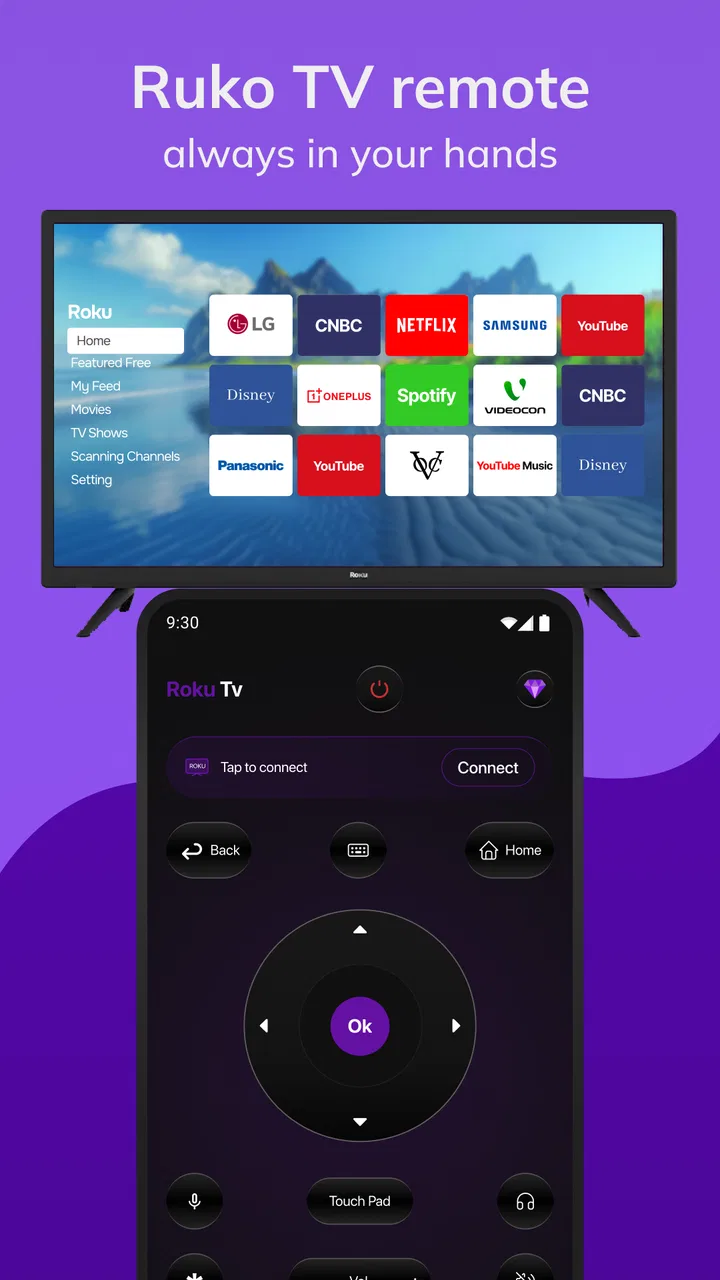
Roku TV Remote Control is a mobile app designed to control compatible Roku streaming players and Roku TVs from an Android or iOS device. After installing it, your phone generally needs to be connected to the same Wi-Fi network as the Roku device. The app can then provide virtual navigation buttons, playback controls, volume options, and keyboard input, depending on the Roku model and app version.
02Is Roku TV Remote Control compatible with every Roku device?
Compatibility can vary between Roku TVs, streaming sticks, boxes, and older Roku models. Most current devices support mobile remote features, but some functions may be unavailable on older hardware or televisions with limited network capabilities. Before downloading, check the app listing and your Roku settings, and confirm that both your mobile device and Roku product are supported in your region.
03Does the app require Wi-Fi, Bluetooth, or an internet connection?
In normal use, the phone and Roku device must usually be connected to the same local Wi-Fi network so they can discover and communicate with each other. Bluetooth is not typically required for standard remote functions. Internet access may still be needed for streaming services and certain account features, while the remote connection itself can depend mainly on the local network.
04What should I do if the Roku TV Remote Control cannot find my Roku device?
First, make sure the Roku device and smartphone are connected to the same Wi-Fi network rather than separate guest, mobile, or 5 GHz and 2.4 GHz networks that cannot communicate. Restarting the app, Roku device, and router can help. Also check whether device discovery permissions are enabled, the Roku is powered on, and the app has been updated.
05Are all remote features available for free, and are there any limitations?
The basic remote functions are commonly available without paying, including navigation, playback control, and text entry, but the exact offering depends on whether you are using an official Roku app or a third-party remote application. Some apps may display advertisements, offer optional subscriptions, or restrict advanced features. Review permissions, pricing, privacy information, and in-app purchase details before downloading.
Pros
- Simple setup with automatic detection of compatible Roku devices.
- Includes a convenient keyboard for faster text entry and searches.
- Private listening works with headphones connected to your phone.
- Offers quick access to installed channels and saved content.
- Useful replacement when the physical Roku remote is lost or unavailable.
Cons
- Requires the phone and Roku device to share the same Wi-Fi network.
- Some features may vary depending on the Roku model or operating system.
- Voice control may be unavailable or limited on certain devices.
- The app can drain battery during extended streaming sessions.
- Ads or premium features may appear depending on the app version.

Roku Tv Remote Control
Gallery